

Cart
0

Table of Contents
- What to Look for When Choosing a Baby Monitor
- Video Baby Monitor Reviews and What Sets Them Apart
- Wi-Fi Baby Monitor vs Non-Wi-Fi: Which Is Right for You
- Baby Monitor Safety and Privacy: Protecting Your Family
- Baby Monitor with Parent Unit: Local Monitoring Without Wi-Fi
- Key Features That Justify Premium Pricing
- Common Mistakes Parents Make When Buying a Baby Monitor
- Frequently Asked Questions
Last Updated: October 17, 2026
What to Look for When Choosing a Baby Monitor
Selecting baby monitors is one of the first major decisions new parents face. The right choice depends on your home layout, comfort with technology, and budget. At Modocam Kids, we break down the features that actually matter.
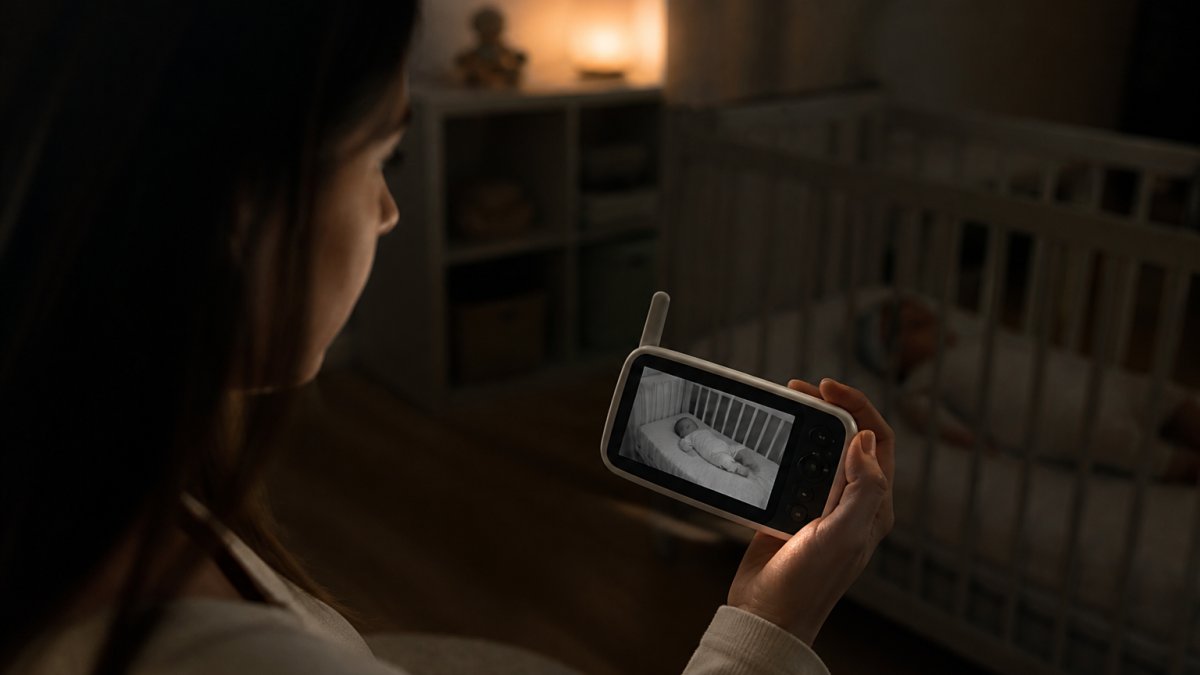
A good baby monitor keeps you connected without creating anxiety. The best balance ease of use, reliable signal, and the features your family needs.
Range and Signal Reliability
Range is the distance your monitor maintains a connection between the camera and parent unit. Most parents underestimate this until they move rooms and lose signal.
Digital monitors typically offer 700-900 feet of range in open space, but walls, floors, and interference shorten real-world range.
Signal stability matters more than raw range. A monitor that holds steady at 500 feet beats one claiming 1,000 feet that drops out randomly. Choose digital transmission over analog, digital resists interference from Wi-Fi routers, microwaves, and cordless phones.
Image Quality and Night Vision
Image quality determines whether you can actually see what's happening in the nursery. A blurry feed defeats the purpose.
Look for at least 320x240 resolution; 480p or better makes it easier to see your baby's face and spot problems.
Test night vision in your actual nursery lighting. A monitor that works in a completely dark room might struggle with a dim nightlight. The best balances clarity with seeing movement and position.
Audio Clarity and Two-Way Talk
Audio clarity lets you hear your baby's cries clearly without false alarms. Poor audio leads to constant false alerts or missed cries.
Two-way talk lets you speak to your baby through the monitor, soothing a crying infant without entering the room, though it's less critical than reliable audio. Some parents find it essential; others rarely use it.
Test microphone sensitivity before purchasing. The Modocam Kids 3.2 Inch Digital Baby Care Device includes two-way intercom and automatic sound activation, making it easy to monitor without constant background noise.

Video Baby Monitor Reviews and What Sets Them Apart
Video monitors provide visual confirmation of your baby's condition. They cost more than audio-only monitors but offer peace of mind many parents value. The trade-off is complexity: more features mean more setup, more potential failures, and more to learn.
Video monitors fall into two categories: Wi-Fi enabled and local video. Local video monitors maintain a closed system between camera and parent unit without internet connection. Wi-Fi monitors connect to your home network and allow remote viewing through a mobile app.
Screen Size and Portability
Screen size affects how easily you can see your baby's condition at a glance. A 3-inch screen differs noticeably from a 5-inch in daily use.
Larger screens (4-5 inches) make details easier to see but are harder to carry and drain battery faster. Smaller screens (2.5-3.5 inches) fit in a pocket or on a nightstand but require closer inspection.
Portability matters if you move between rooms or travel. A lightweight parent unit with good battery life lets you move freely without a charging cable.
Pan, Tilt, and Zoom Capabilities
Pan and tilt let you adjust the camera's view without physically moving it. Useful if your baby sleeps in different positions or you need to check different areas of the nursery.
Basic monitors have a fixed field of view. Pan and tilt add complexity and another failure point.
Zoom helps you see fine details, checking if your baby's nose is clear, verifying a sound was movement and not a concern. Digital zoom is less useful than optical because it reduces image quality.
Wi-Fi Baby Monitor vs Non-Wi-Fi: Which Is Right for You
This decision shapes your entire monitoring experience. Wi-Fi monitors offer remote access but require internet and introduce privacy considerations. Non-Wi-Fi monitors work anywhere in your home but don't allow remote viewing.
Wi-Fi monitors excel when you need to check on your baby from outside the home, while at work, running errands, or traveling. Non-Wi-Fi monitors work reliably without internet and eliminate data transmission concerns.
Remote Access and Mobile App Integration
Remote access through a mobile app lets you monitor your baby from anywhere with an internet connection. This appeals to many parents but introduces dependency on your home Wi-Fi and internet service.
Mobile apps vary widely. Some are intuitive and responsive; others are slow or crash frequently.
Cloud storage for video recordings usually requires a subscription costing $5-15 monthly, adding to your total cost of ownership. Some parents find it essential; others view it as unnecessary expense.
Offline Operation and Connection Stability
Non-Wi-Fi monitors work anywhere in your home without depending on internet connection. This appeals to parents with unstable internet or concerns about data privacy.
Digital non-Wi-Fi monitors keep a closed connection between camera and parent unit. No data leaves your home, eliminating cloud storage costs and concerns about data breaches or unauthorized access.
The trade-off is that you can't check on your baby remotely. If you're away from home and need to verify your baby is okay, a non-Wi-Fi monitor can't help. For parents who work outside the home, this limitation is significant.
Baby Monitor Safety and Privacy: Protecting Your Family
Baby monitor security breaches have made headlines in recent years. Unauthorized access to monitors creates genuine safety concerns. Understanding the risks helps you choose a monitor that protects your family.
3.2 Inch Digital Baby Care Device →
Data Security and Encryption
Encryption protects data transmitted between your monitor and any connected devices. Without encryption, data travels unprotected across your network.
Wi-Fi monitors should use modern encryption standards (WPA2 or WPA3). Check the manufacturer's specifications or contact customer service to confirm.
Cloud storage services should encrypt data both in transit and at rest. This means data is scrambled while traveling to servers and while stored on company servers.
Create a strong, unique password for any online account associated with your monitor. Many security breaches result from weak or reused passwords, not manufacturer failures. Change default passwords immediately after setup.
Subscription Costs and Hidden Fees
Subscription costs add up over time and often surprise parents after purchase. A $100 monitor becomes a $180 monitor when you factor in two years of cloud storage subscription.
Calculate total cost of ownership before deciding. A cheaper monitor with expensive subscriptions might cost more than a premium monitor with lower ongoing fees.
Check whether subscriptions are required for basic features. Some manufacturers require subscription just to enable cloud storage; others require it for app access or advanced features. Understand exactly what you're paying for before committing.
Baby Monitor with Parent Unit: Local Monitoring Without Wi-Fi
Parent units (also called receivers or base stations) provide dedicated monitoring without requiring a smartphone. Many parents appreciate having a device dedicated to baby monitoring rather than relying on their phone.
A quality parent unit displays clear video, has intuitive controls, and maintains reliable connection throughout your home.
Parent units work anywhere in your home, even in rooms without Wi-Fi coverage. The closed system between camera and parent unit eliminates data transmission concerns. Battery life on parent units varies from 5-12 hours depending on model and usage.
Key Features That Justify Premium Pricing
Some baby monitors cost twice as much as others. Understanding what you're paying for helps you decide whether premium features matter for your situation.
Temperature Monitoring and Sleep Analytics
Temperature monitoring displays the nursery temperature on your monitor. This helps you ensure your baby is comfortable and not too hot or cold.
Sleep analytics track your baby's sleep patterns and provide insights into sleep quality. This feature appeals to parents concerned about sleep development or troubleshooting sleep issues. Sleep tracking is less critical than core monitoring features but can be valuable if sleep is a concern.
The Modocam Kids 3.2 Inch Digital Baby Care Device includes temperature monitoring, allowing you to verify nursery conditions at a glance without entering the room.
Multi-Room Monitoring and Two-Camera Bundles
Multi-room monitoring lets you watch multiple rooms simultaneously. This matters if you have twins, multiple young children, or want to monitor both a nursery and playroom.
Two-camera bundles cost less than buying monitors separately but add complexity. You need to manage multiple cameras, ensure they're both connected, and monitor multiple feeds. For families with one child, a single camera is simpler.
Battery Life and Rechargeable Units
Battery life determines how long you can monitor without access to charging. Parent units with longer battery life provide more flexibility.
Rechargeable parent units eliminate the need for disposable batteries but require regular charging. Some parents prefer disposable batteries to avoid the charging routine. Others prefer rechargeable to reduce waste and ongoing battery costs.
Common Mistakes Parents Make When Buying a Baby Monitor
Understanding what goes wrong helps you avoid the same pitfalls.
Overestimating range is the most common mistake. Parents assume a monitor rated for 900 feet will work throughout their entire home.
Choosing based on features you won't use wastes money. Fancy features like pan-and-tilt, zoom, or two-way talk appeal during shopping but sit unused in daily life.
Ignoring subscription costs creates budget surprises. A monitor costing $80 becomes $280 when you add two years of cloud storage subscription. Calculate total cost before deciding.
Selecting based on reviews from people with different home setups leads to disappointment.
Choosing the right baby monitor requires balancing reliability, features, and cost. Explore our selection of premium baby essentials and find the monitor that works for your family. Consumer Reports on baby monitor safety provides additional testing insights for parents prioritizing safety features. For privacy-conscious families, FTC guidance on connected device security offers practical steps to protect your home network.
| Feature | Local Video Monitor | Wi-Fi Monitor |
|---|---|---|
| Remote access | No | Yes |
| Subscription required | No | Often yes |
| Setup complexity | Simple | Moderate |
| Data privacy | Highest | Depends on provider |
| Works without internet | Yes | No |
| Cost range | $50-150 | $100-300+ |
Pro Tip
Test your monitor's range in your actual home before the return period expires. Walk through your home while monitoring the signal strength, you'll quickly discover dead zones where connection drops. This real-world test reveals whether the monitor will work for your daily routine.
Watch Out
Don't skip password changes on Wi-Fi monitors. Default passwords are publicly available, and many security breaches exploit unchanged defaults. Create a unique, strong password immediately after setup to protect your family's privacy.
Frequently Asked Questions
What should I look for when buying a baby monitor?
Prioritize signal reliability and range to ensure coverage throughout your home. Check image quality, especially night vision clarity, since you'll be monitoring in darkness. Look for two-way audio so you can comfort your child remotely. Consider whether you need Wi-Fi connectivity for mobile app access or prefer a non-Wi-Fi local video monitor for privacy and offline operation. Battery life matters if portability is important, and temperature monitoring adds value if you're concerned about room conditions.
Are Wi-Fi baby monitors safe to use?
Wi-Fi monitors offer remote access but require careful attention to security. Choose models with strong encryption and secure password protection. Research the manufacturer's data privacy practices before purchase, avoid monitors with unclear data policies. Non-Wi-Fi local video monitors eliminate remote access risks entirely, making them ideal if privacy is your primary concern. Either way, verify that the device uses digital signal transmission rather than analog, which is more resistant to interference and more secure.
Is a baby monitor with a parent unit worth the extra cost?
A dedicated parent unit provides reliable local monitoring without Wi-Fi dependency, subscription fees, or data privacy concerns. It's especially valuable if your home has poor Wi-Fi coverage or if you prefer not to manage app connectivity. Parent units typically have longer battery life and simpler setup than Wi-Fi models. However, they lack remote access when you're away from home, so they're best for parents who monitor primarily while in the house or nearby.
How much should I spend on a baby monitor?
Entry-level monitors with basic video and audio start around $50, offering solid functionality for most families. Mid-range models ($80-$200) add features like pan-and-tilt, better zoom, and improved night vision. Premium options ($250+) include smart features like sleep analytics, multi-room monitoring, and advanced app integration. Your budget depends on your home size, whether you need portability, and whether you want Wi-Fi connectivity. Don't assume higher price guarantees better performance, focus on the specific features your family needs.

